
Data Quality Score
FamilySearch

project overview
Role
UX Designer Intern
Duration
Shipped
Methods
Senior Designer, PMs, Engineers
Methods
Heuristic review, user interviews, A/B testing, usability testing
01
problem
Existing design wasn't getting through to users.
Before any user testing, I did a self-directed heuristic review of the existing designs. Two things stood out immediately:
First, the feature was called "Person Quality Score" and used a star rating system to convey data quality across different dimensions (completeness, source consistency, conflict-free data, and so on). Stars communicate subjective preference, not objective quality. I worried users would read this as a rating of the person rather than an assessment of the data.

Potential points confusion that a person, instead of the data, is being subjectively rated.
Second, the DQS existed separately from the Research Helps section, which was the existing tool users already relied on for finding gaps in their tree. I couldn't tell how the two features were meant to relate to each other, and suspected users wouldn't either.
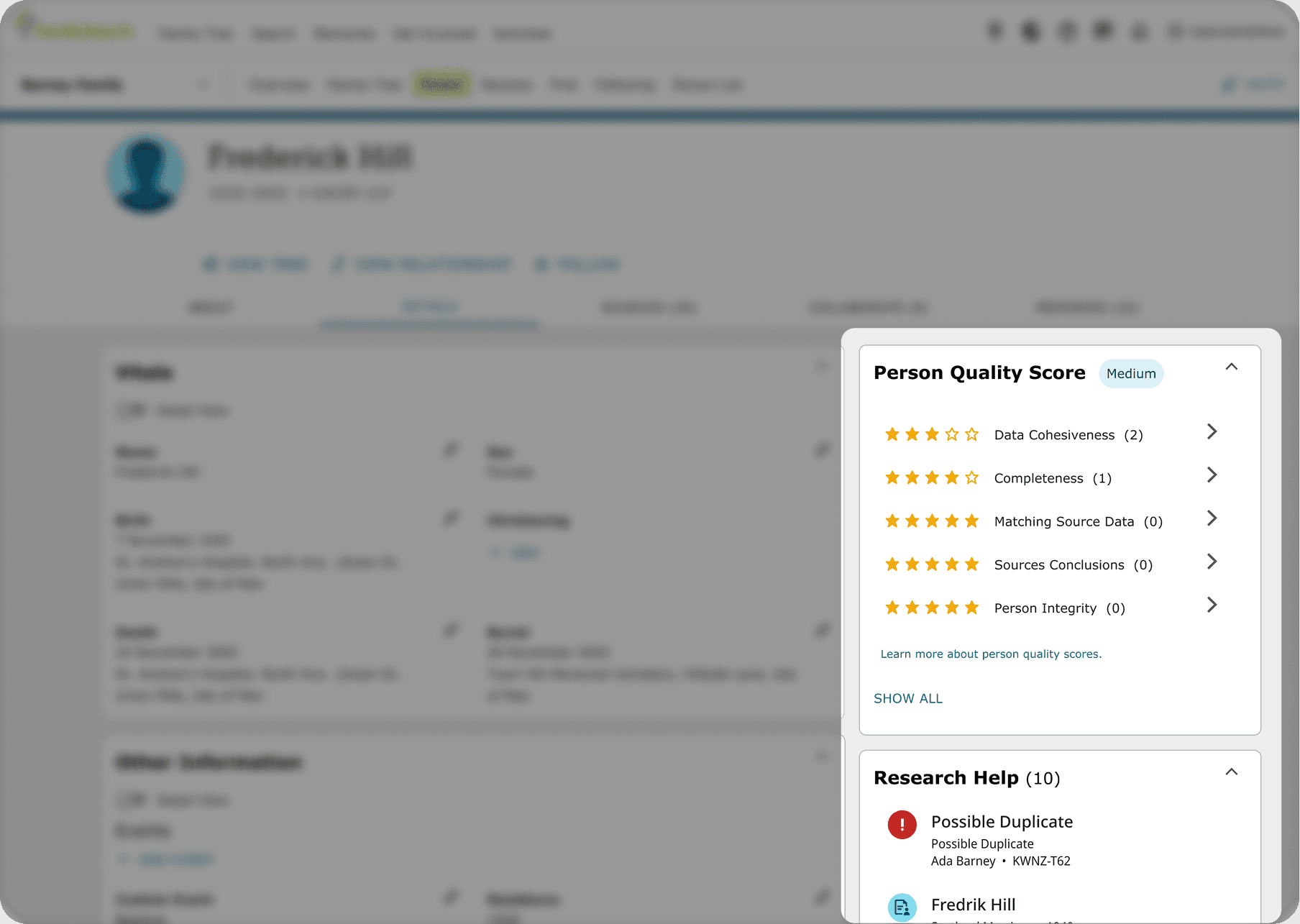
As both features aim to solve the same problem, users may not understand how they relate.
These were hypotheses at that stage. To validate them, my senior designer and I visited a FamilySearch center to run observational tests and interviews on the existing designs.
Users didn't understand what the icons meant, what the score was measuring, or what they were supposed to do next. The scoring felt complex and hard to interpret, and there was no real sense of urgency to act on it.
One moment that stuck with me: when we showed users the "Person Quality Score" label with star ratings, one reaction we got was along the lines of "Why are you saying my grandma is a medium?" Users weren't reading it as a data quality assessment. They were reading it as a judgment on the person. That told us the naming and the visual metaphor needed to change, and gave us a clear target for the next round of iteration.
02
process
Four rounds of iteration, each targeting what the last round surfaced.
From the initial findings, we moved through several distinct rounds of design and testing. Each round addressed a specific problem the previous round had revealed.
Round 1
Replace stars with progress bars. Rename the feature.
I redesigned the score display to use a bar system, progressively filled to signal quality level across each dimension, shifting the metaphor from "rating" to "progress toward completion." I also renamed the feature from "Person Quality Score" to "Profile Quality Score," and later to "Data Quality Score," to ground it in what was actually being assessed.
A/B testing confirmed users now understood what the score measured. But two new problems emerged: the visual treatment wasn't conveying urgency, and the score still felt disconnected from Research Helps, the tool experienced users already relied on.

A/B testing confirmed users now understood what the score measured.
Round 2
Rethink the colour system. Integrate DQS into Research Helps.
The bars were using amber yellow at varying shades, and it wasn't landing. The instinct might have been to switch to red for low scores, but red carries a negative, alarming connotation that felt wrong for a feature meant to motivate ongoing improvement. Instead, after experimenting with several options and discussing with my mentor, we moved to green: a colour that signals progress and action rather than punishment. A partially filled green bar should make users want to push it further, not feel anxious about what they'd done wrong.
In parallel, we addressed the disconnect with Research Helps. Rather than rebuilding a section users already trusted, we kept its structure intact and added contextual tags linking relevant DQS items to related hints.
Two prototype tests and one interview with experienced users confirmed the integration felt natural rather than disruptive.
Before
After

Round 3
Make DQS collapsible to reduce cognitive overload.
During testing, we had noticed users were getting drawn into the detailed breakdown of the quality score even when their real goal was to work through Research Helps. The DQS was pulling focus in a way that felt counterproductive.
We also noticed that there was still some users that struggled with the new and unfamiliar hints from the DQS and it’s relevant tags. This signalled that perhaps we might’ve have taken the design a little to fair and need to step back, especially given that a larger portion of it’s users were more mature adults.
Based on those observations, we reverted back keeping the Quality Score feature’s hints separate from the Research Help hints so as to keep the familiar structure but still keeping it integrated within the Research Help section. We also made the quality score collapsible, positioning it as a secondary, complementary tool. Users could see their overall score at a glance, then expand for detail if they wanted to act on it specifically, without interrupting the primary task flow.
Before
After

Round 4
Validate the full flow. Finalize copy.
With the core design decisions in place, I ran two rounds of remote usability testing via usertesting.com, having users complete scenario-based tasks across the entire redesigned experience: the progress bars, the Research Helps integration, and the collapsible DQS together. With the flow validated, the final step was refining the copywriting, which then went through formal review by the copy team.
03
solution
A score that signals progress, not judgment.
The final design replaced the original star-based "Person Quality Score" with a renamed "Data Quality Score" that used green progress bars across each quality dimension. It lived as a collapsible companion to the Research Helps section, surfacing related quality issues through contextual tags without disrupting the existing workflow.
Two design decisions I contributed to directly were carried into the final build: the shift to green as the primary quality indicator color, and the collapsible structure based on the focus observation during testing.
Desktop View

Mobile View

04
outcome
Decrease in errors, increase in trust.
My internship ended before the feature launched publicly, so I don't have post-release metrics to point to. What I can say is that across the rounds of testing, the design moved from a state where users couldn't articulate what the score was measuring to one where they understood its purpose, felt motivated to engage with it, and could navigate it alongside their existing Research Helps workflow without friction.
03
reflection
Intricacies of building for trust.
The naming and visual metaphor of a feature carry more weight than they seem to. Changing "Person Quality Score" to "Data Quality Score" and replacing stars with bars wasn't cosmetic: it changed how users understood the feature's purpose entirely.
I also came to appreciate the tension between a new feature and an existing, trusted workflow. The instinct is to give new features space, but sometimes the more respectful design decision is to integrate quietly rather than compete for attention.
And practically: the value of watching real users interact with a design is irreplaceable. The "grandma" moment wasn't something any of us would have predicted in a design review.


