
Potential Parent Hint
FamilySearch

project overview
Role
UX Designer Intern
Duration
In progress at internship end
Methods
Senior Designer, PMs, Engineers
Methods
Competitive analysis, prototyping, usability testing
01
problem
Designing trust into a feature with no prior version
There was no existing interface to evaluate or improve on, only the algorithm and the goal of surfacing missed connections. I started with a competitive analysis of Ancestry's equivalent potential-person hint feature, then worked through use cases and scenarios to define the problem space before designing anything.
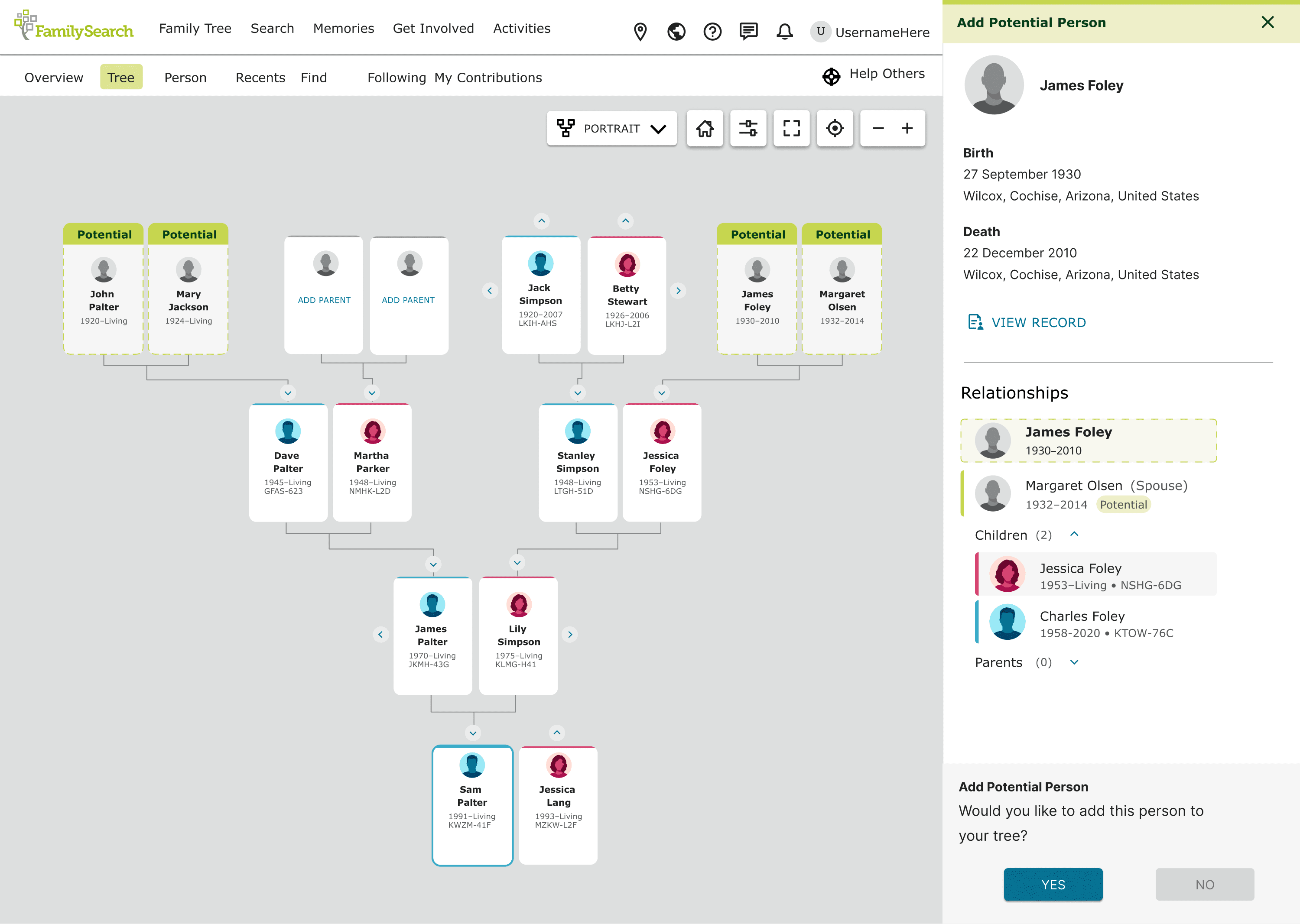
My first design represented a hint as a person card tagged "Potential," with a dotted outline distinguishing it from people already in the tree. Clicking it opened a details page. It was a reasonable starting hypothesis, but testing it is what revealed the real problem: surfacing a potential match wasn't enough on its own.
Experienced users cared less about discovering a new match and more about whether they could trust it. Many also didn't register that the hinted person wasn't actually in their tree yet, or that any action was needed at all.
Watching the sessions, I noticed a consistent behavior: users would manually open the person's attached record in one tab and compare it against existing relationships in another, cross-referencing names, dates, and timelines by hand to convince themselves the match made sense. That told us the real design problem wasn't visibility, it was trust and clarity of action, neither of which the first design had been built to solve.
Majority of users felt a need to manually verify the hint provided. Some users also failed to recognise that the hinted persons was yet to be added to their tree.
02
process
Four rounds of iteration, each targeting what the last round surfaced.
From the initial findings, we moved through several distinct rounds of design and testing. Each round addressed a specific problem the previous round had revealed.
Verifiability
A side sheet that brings the evidence to the user.
The manual cross-referencing behavior pointed to a clear gap: users needed evidence, not just a suggestion. My mentor and I discussed the idea of consolidating that evidence into one place, and I led the design of a side sheet that opens directly from the hint. At the top sits the record artifact itself with a link to view it in full. Below that is summarized information about the person, followed by an expanded view of their relationships and pedigree. The goal was to let users do their verification in one panel instead of juggling tabs.

A/B testing confirmed users now understood what the score measured.
Recognisability
Making "this isn't in your tree yet" impossible to miss.
The first round of testing already had a dotted border distinguishing hint cards from confirmed ones, but it was too subtle, light dotted lines on a fill similar to existing person cards. Working to translate this research insight into a concrete design response, I tested a more deliberate version: a darker, higher-contrast dotted border, a hollowed-out card fill instead of the solid grey used for confirmed people, gendered (but still greyed-out) avatars to reduce the cognitive load of identifying who the person might be, a "Review" call-to-action button, and explicit copy in the side sheet stating the person doesn't yet exist in the tree and explaining why the system thinks they belong. Experienced users confirmed the integration felt natural rather than disruptive.
The second round of testing, run across both changes together, showed users were now able to both trust the hint and correctly recognize that action was needed.

Scaling the pattern
Extending the design across every tree view.
FamilySearch's Family Tree can be viewed in several different layouts: portrait, landscape, fan chart, pedigree, descendancy, and first ancestor view. Once the core card and side sheet pattern was validated, I worked through how the hint needed to adapt across each of these views, plus both the tree page and person page contexts, and completed responsive designs for mobile and desktop. This was a useful lesson in mobile-first thinking, and in how much a single design decision can multiply in complexity once it has to hold up across that many surfaces.

03
solution
A hint that proves itself before asking for action.
The final design combined a clearly distinguished, high-contrast hint card with a side sheet that surfaces the supporting record and relationship context up front. Rather than asking users to take the system's word for a match, the design let them verify it in place, then act with a clear "Review" prompt. The pattern was extended consistently across all of Family Tree's view modes and both desktop and mobile.
Desktop View

Mobile View

04
outcome
Increase in feature confidence and engagement.
My internship ended as the feature was heading into alpha and beta testing, so I don't have post-launch metrics. What the second round of testing showed was a clear shift: users went from being unsure whether a hint was trustworthy or even actionable, to confidently evaluating the evidence and knowing what to do next.
03
reflection
Value of the first test when designing from scratch.
This project taught me that designing a brand-new feature is a different discipline from redesigning an existing one. There was no baseline to react to, which meant the first round of testing had to do double duty: validating the concept and surfacing the real problem at the same time.
It also gave me a deeper appreciation for the cost of design decisions beyond the screen. Because this was a new feature built on a new algorithm, even small interface choices, like what information to surface in the side sheet, had real implications for backend logic and data retrieval, not just visual design.


